We introduced user advertisements to Brixus not too long ago. They are designed to help promote your item’s sales, boost your place’s visits, and attract members for your group. In this article we go over several tips to create an effective ad ensuring your creations get the recognition they deserve.
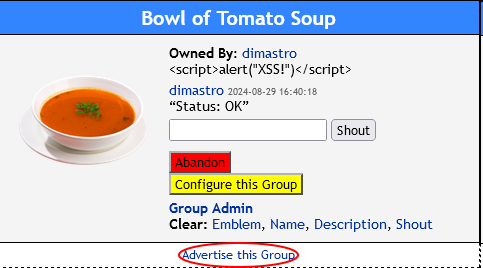
To create a new advertisement for your group, item, or place, go to its page and click the “Advertise this …” link.
You should be presented with our Advertisement Builder.
You may label your advertisement by titling it. This text will be show when the user mouse-overs your ad.
Your ad type is essentially the dimensions of the ad slot you desire your image be inserted into. Banner ads are a popular choice as they are featured on nearly all pages. Rectangle and Skyscraper ad slots are more selective and are only present on certain pages.
The image that you upload must fit precisely in the slot of the ad type you selected. To avoid issues, you are welcome to use our Advertisement Image Templates. These templates are designed specifically to suit the dimensions of the ad slot which you are working with.
After you have created your new advertisement, it must be manually approved by a moderator. This process may take a few hours.
After your advertisement has been approve, you are now ready to launch it onto our web site. To do this, head to the Advertising page, select the advertisement you would like to launch, and click Run Ad. Your ad will run for 1 day.
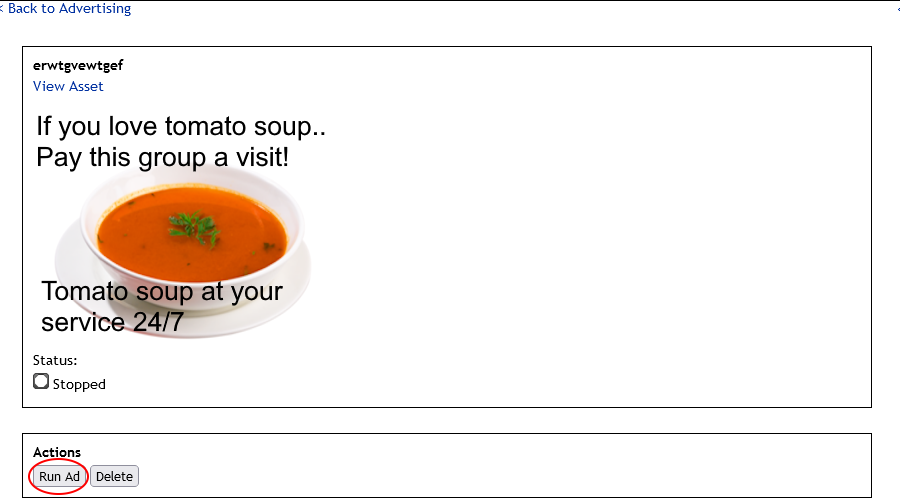
Once your ad is running, you will be able to get an idea on how well your ad is performing using the information in the Ad Performance Stats table.
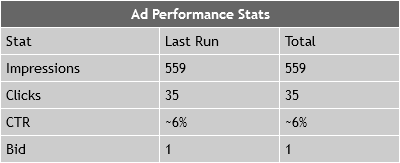
Here is a helpful list of definitions:
- Impressions: number of times your ad was displayed.
- Clicks: number of users that clicked your ad.
- CTR: click-through rate (clicks / impressions)
- Bid: the number of Coins that you bid on the ad.
And with all of that said, I wish you all good luck with your future advertising endeavours!
-dimastro